How automatic categorization works
T:0 categorizes most transactions without your involvement. This article explains what does the categorizing, how to trace what it did, and when a transaction comes to you instead.
How it works
T:0's AI reads your business profile, your chart of accounts, and the data received from your connected integrations, then automatically categorizes your transactions.
The rules T:0 uses are deterministic — the same transaction is always treated the same way. T:0's AI generates the accounting logic; it does not write directly to your ledger. Those deterministic rules do.
You can review the rules T:0 generates through the Ask T:0 chat. There you can edit your entity's accounting rules, simulate them against real transactions to see what the books would do, and publish the changes once you approve them.
Trace what a rule did
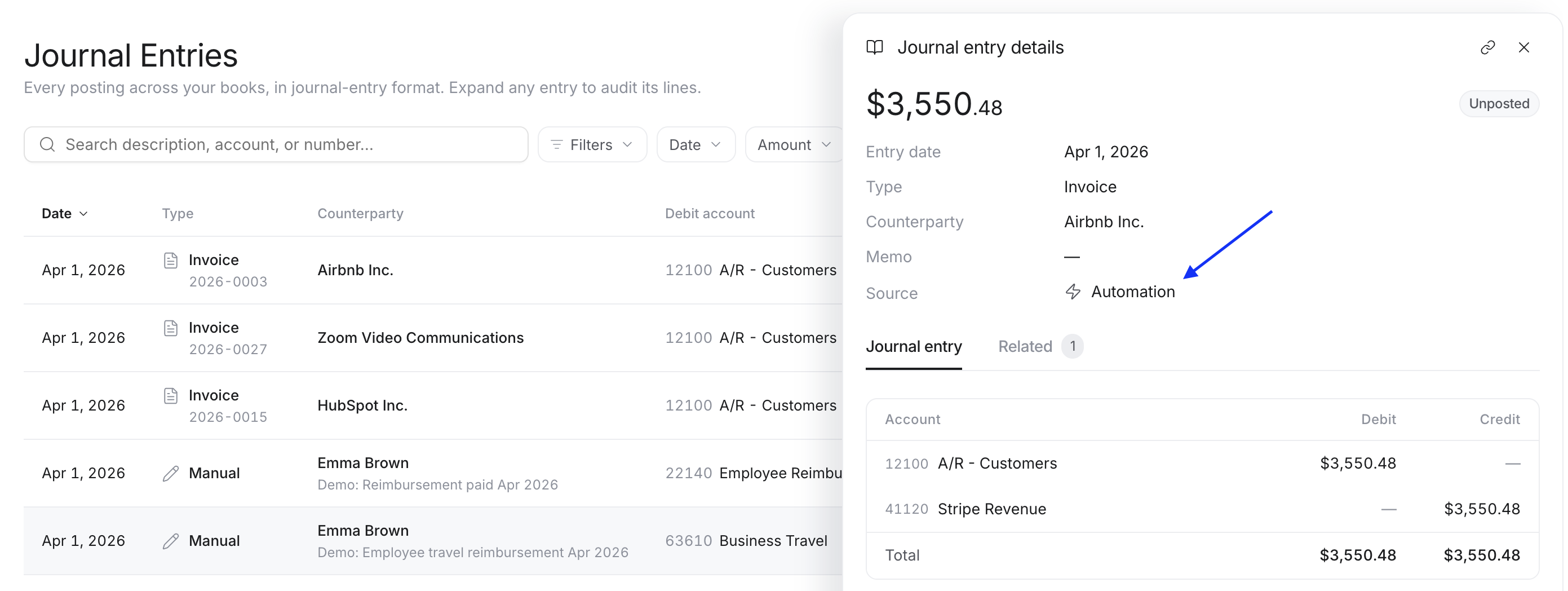
When a rule categorizes a transaction, T:0 posts a journal entry and records where it came from.
-
Open any entry in Journal Entries.
-
Check its Source field — entries created by rules show Automation.
-
The entry's Related tab lists the records it's connected to.
When a transaction needs you
When no rule fits a transaction, or it needs your judgment, it goes to the Inbox for you to categorize.
